Convert an Image to Minecraft Pixel Art
Turn any image into a Minecraft build plan. Every pixel becomes one concrete block, the converter names each block and counts how many you need, and you can print a numbered grid to build from.
Colors in your pixel art
Example: a sunset in concrete blocks
A sample sunset picture at 64 blocks wide, mapped to the 16 concrete colors. The largest color in it is Blue Concrete, at 1,151 blocks.
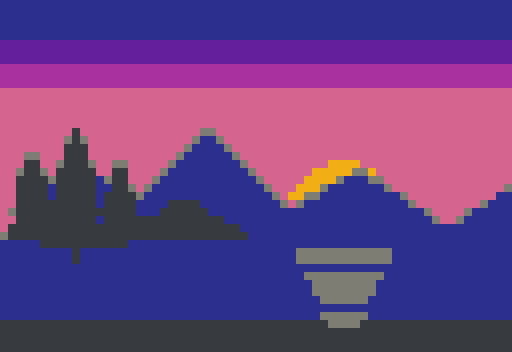
How to convert an image to Minecraft pixel art
Minecraft pixel art is a picture built from blocks, where every block is one pixel. The hard part is planning it: how many blocks wide, which block for which color, and how many of each to collect. This page does that planning for you.
- Upload your image. Logos, game characters you drew yourself, pets and simple scenes all work well.
- Set the width in blocks. The pixel width is the number of blocks across. The page starts at 64. Height follows your image, or tick Square.
- Keep the Minecraft concrete palette. Each pixel is matched to the nearest of the 16 concrete colors.
- Read the block list. Under the canvas, every block used is listed by name with a block count.
- Print the grid. Download printable grid gives you numbered rows and columns to follow while you build.
For non-Minecraft projects, the main image to pixel art converter has more palettes and every setting.
Why concrete blocks?
Concrete is the go-to block for pixel art because each of the 16 colors is one flat, even shade with almost no texture, so the picture reads cleanly from a distance. All 16 colors can be made in survival: craft concrete powder from sand, gravel and dye, then touch it with water to harden it. If you prefer other blocks, choose Custom hex codes and paste their colors.
The colors used here are averages of each block's texture. They are close to what you see in game, but lighting, shaders and resource packs can shift them slightly.
Choose the right size
Every pixel is one block, so size decides how long the build takes and how much detail survives.
| Width | Blocks (for a square) | Feels like |
|---|---|---|
| 32 | about 1,000 | A quick afternoon build, simple shapes |
| 64 | about 4,000 | Faces and characters are recognizable |
| 128 | about 16,000 | One full map of detail, a big project |
Two limits are worth knowing. A wall built upward in Java Edition 1.18 and later can be at most 384 blocks tall, from y = -64 to y = 320. And one Minecraft map shows a 128 × 128 block area, so a 128 × 128 floor build that lines up with the map's borders fills exactly one map.
Gather the blocks
The block list is sorted from most used to least used. Divide each count by 64 to get the number of stacks: 1,151 Blue Concrete is just under 18 stacks. If a color appears only a few times, it is often fine to lower the width a little or swap it for a neighbor color by hand.
Build from the printable grid
The printable grid numbers every column and row and draws a heavier line every 5 or 10 blocks. Build one row at a time, from left to right, and mark finished rows on a printout or on your screen. Building on the ground as a floor is easiest; you can view it from above or on a map. Building upward as a wall needs scaffolding, so start from the bottom row.
Planning a smaller build? The 32x32 pixel art page crops your image to a perfect square. For bead or stitch patterns from the same image, see the pixel art grid guide, or return to the image to pixel art converter for every option.
Minecraft pixel art questions
Which Minecraft blocks does the converter use?
The 16 concrete blocks, one for each dye color. The color list names each block, for example Light Blue Concrete, and counts how many your build needs.
Does it work for Java and Bedrock Edition?
Yes. Concrete exists in both editions with the same 16 colors, so the same plan works in either.
Are the block colors exact?
They are close but not exact. Each color is an average of the block's texture, and lighting and shaders change how blocks look in game. Check a small test patch if a shade matters.
Can I use wool, terracotta or other blocks?
Not as a built-in palette yet. You can choose Custom hex codes and paste the colors of any blocks you want to use, but the color list will then show hex codes instead of block names.
Does it make a schematic or Litematica file?
No. You get a PNG of the design, a printable numbered grid and a block count. You place the blocks yourself, row by row, using the grid.