32x32 Pixel Art Maker
Turn any image into 32x32 pixel art. The picture is cropped to a square from the center, reduced to 32 by 32 pixels and limited to a small palette, ready for icons, sprites and avatars.
Colors in your pixel art
A 32x32 example
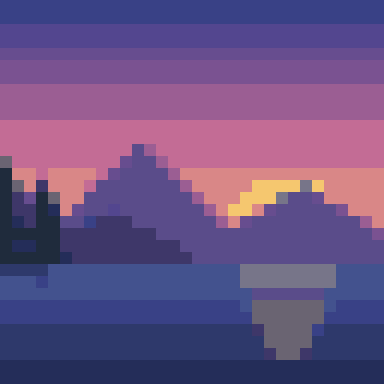
A sample sunset picture after the converter cropped it to a square and reduced it to 32 × 32 pixels with 16 colors. Shown 12× larger.
How to make 32x32 pixel art from any image
32x32 means the finished picture is 32 pixels wide and 32 pixels tall, 1,024 pixels in total. This page has the converter set up for that exact size: square crop on, width 32, download at true size.
- Upload an image. Anything works, but a single object or face in the middle of the picture gives the best result.
- Check the crop. The converter keeps the largest square from the center. Press and hold the Hold to see original button to see exactly which part it kept.
- Choose the colors. 16 auto colors is the default. Try 8 for a bolder icon, or a palette like PICO-8 if the sprite has to match other game art.
- Download. Download PNG saves a file that is exactly 32 × 32 pixels. Switch the download size to Large for a 1,024-pixel copy with sharp square pixels.
Need a different width, a non-square shape or custom colors? The main image to pixel art converter has every setting.
Why 32x32 is such a popular size
32 by 32 has been a standard size for game sprites, inventory items, desktop icons and emoji for decades. It is big enough to show a recognizable character or object, with eyes, an outline and a bit of shading. It is small enough that every pixel matters, which gives it that clean, deliberate pixel art look. It also scales up perfectly: 2× is 64, 4× is 128, 8× is 256, with no uneven pixels.
Get a good result at 32x32
At this size the converter has only 1,024 cells to describe your whole picture, so a few habits help a lot:
- Fill the frame. Crop so the subject touches or nearly touches the edges. A small object in a big scene shrinks to a few pixels.
- Use fewer colors than you think. 8 to 16 colors look sharper than 32, because each color covers a real area instead of single stray pixels.
- Add contrast. Pushing contrast up by 10 to 20 makes the outline separate from the background.
- Skip dithering. Dithering needs space to work. At 32x32 it mostly adds noise.
- Touch up by hand. Treat the result as a base. Opening the true-size PNG in any pixel editor to fix an eye or an outline pixel takes a minute and makes a big difference.
Other common pixel art sizes
| Size | Pixels | Good for |
|---|---|---|
| 16 × 16 | 256 | Favicons, tiny items, minimal icons |
| 32 × 32 | 1,024 | Sprites, inventory icons, emotes |
| 64 × 64 | 4,096 | Detailed characters, avatars, tiles |
| 128 × 128 | 16,384 | Portraits, scenes, prints |
You can make any of these here: keep Square ticked and change the pixel width.
Using your 32x32 art
Game engines like Godot, Unity and GameMaker accept the true-size PNG directly; just set the texture filter to nearest or point so it is not smoothed. For a profile picture or a print, download a larger copy so websites do not blur it when they resize. To plan beads or stitches from the same image, open the pixel art grid page, and for photos of people and pets try picture to pixel art. You can always switch back to the full image to pixel art converter.
32x32 pixel art questions
Does it crop or stretch my image?
It crops. With Square ticked, the converter takes the largest square from the center of your image and never stretches it. If the subject is off-center, crop the picture yourself before uploading.
Can I download a file that is exactly 32 by 32 pixels?
Yes. This page starts with the download size set to True size, so Download PNG saves a 32 × 32 pixel file. Choose Large or 8× instead if you want a bigger copy for sharing.
How do I make 16x16 or 64x64 pixel art instead?
Keep Square ticked and type 16 or 64 into the pixel width box, or click the 16 or 64 preset and tick Square again. Everything else works the same way.
Why does my 32x32 sprite look blurry in my game?
The game engine is smoothing it when it scales the sprite up. Set the texture filter to Point or Nearest (in Godot, Unity and most engines) and the pixels will stay sharp.
Can I use it to make a favicon?
Yes. Download the 32 × 32 PNG at true size. Most browsers accept a PNG favicon, and favicon tools can turn the same file into an .ico if you need one.